AWS ECR — Private Container Registry Pipeline
Moved container images off the local machine and into Amazon Elastic Container Registry — a fully managed private Docker registry — then wired Docker Compose to pull the cloud-hosted image and run the full Flask + MySQL stack.
- Problem
- Images on a laptop or public Docker Hub had no access control and nowhere AWS could pull from.
- AWS services
- ECRIAMAWS CLIDocker Compose
- Result
- A 66.68 MB arm64 image in a private, IAM-governed repo, pulled straight into Compose.
Architecture
- Step 1: The image is built locally from the Dockerfile.
- Step 2: Docker authenticates with a short-lived ECR token piped via --password-stdin, so nothing lands in shell history.
- Step 3: The image is tagged with the full registry URI and pushed to a private, IAM-governed repo.
- Step 4: Compose pulls the image straight from ECR.
- Step 5: The web container runs alongside MySQL, rebuilt cleanly with --force-recreate.
- IAM-governed image storage
- Private
- Architecture-specific manifest
- linux/arm64
- Image pushed to us-east-1
- 66.68 MB
Why it matters
Proprietary images move out of local or public storage into private, IAM-governed storage that AWS can pull from. A verified 66.68 MB image is now consistently pullable by Compose and by future AWS runtimes.
The problem in detail
Keeping proprietary application images on the local machine or on public Docker Hub meant no access control, no encryption at rest and no reliable way for AWS services to pull the image. Deployments needed a private, IAM-governed registry that ECS, EKS and Lambda could pull from instantly.
What I built
- 01
Built the application image locally from the Dockerfile with docker build -t web-app .
- 02
Created a private ECR repository in us-east-1 via the AWS CLI: aws ecr create-repository --repository-name web-app --region us-east-1.
- 03
Authenticated the local Docker CLI against the registry with aws ecr get-login-password piped into docker login --password-stdin, so credentials are never stored in shell history.
- 04
Tagged the local build with the full registry URI (872515293031.dkr.ecr.us-east-1.amazonaws.com/web-app:latest) so Docker knows which account, region and repository the image belongs to, then pushed it.
- 05
Pointed the Compose web service at the ECR image URI and ran docker-compose pull followed by docker compose up -d --force-recreate to rebuild the stack from the cloud image, tearing it down cleanly with docker-compose down.
- 06
Verified the push through the ECR console (image index, digests, size) and with aws ecr describe-images from the CLI.
Evidence
01 / 05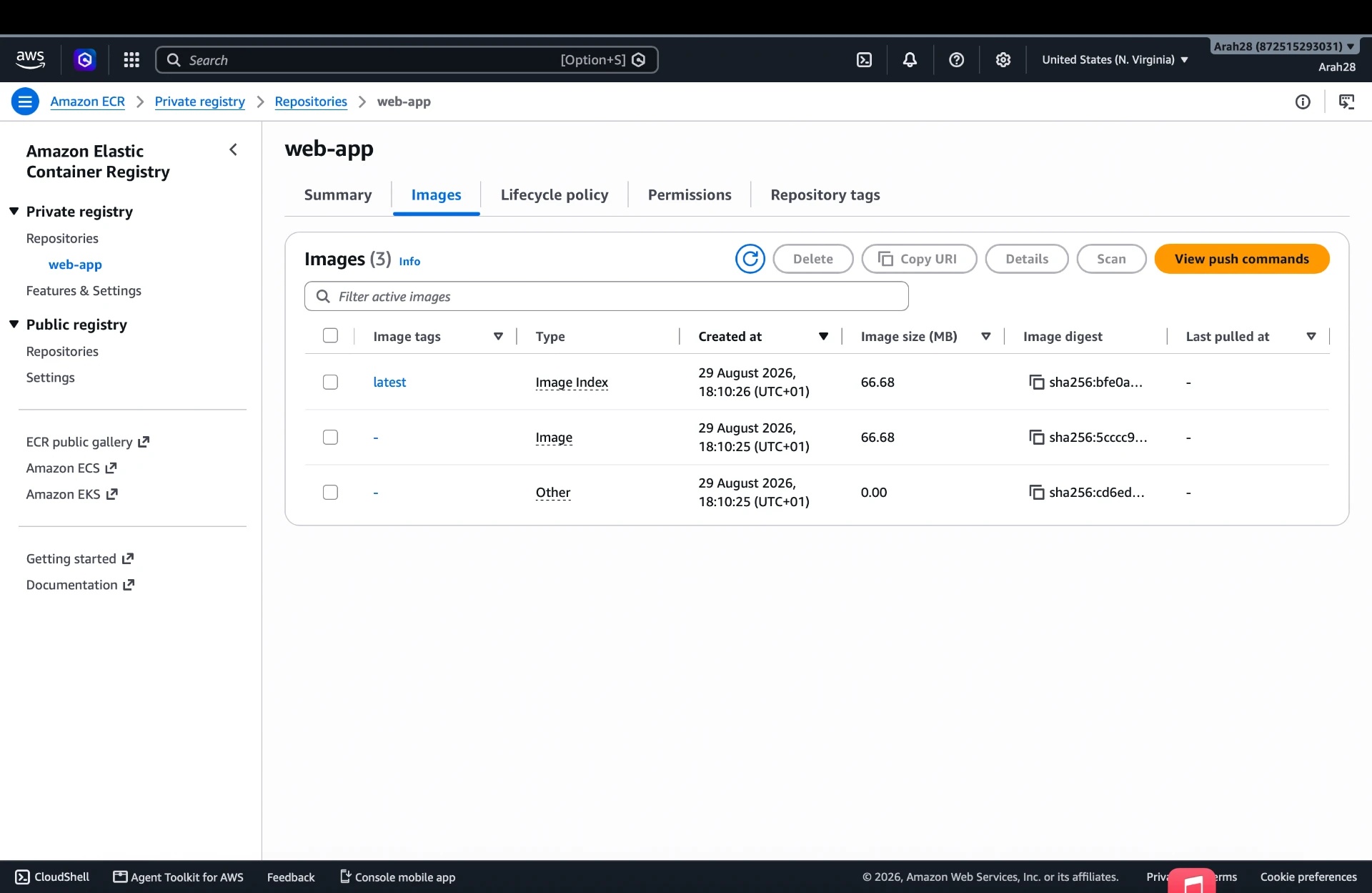
Stage 01 — the private web-app repository in the ECR console showing the pushed image index, digests and sizes.