Docker Compose — Declarative Multi-Service Stack
Replaced a chain of manual docker run, docker network create and port-mapping commands with a single declarative docker-compose.yml that spins up a Flask app and MySQL database as one reproducible stack.
- Problem
- Running a two-container app meant a fragile chain of manual docker commands.
- Tools
- Docker ComposeFlaskMySQL
- Result
- The whole stack starts with one command, identical on every machine.
Architecture
- Step 1: One version-controlled file describes the whole stack.
- Step 2: One command builds the web image, creates the network and starts both services, database first (depends_on).
- Step 3: Users reach the Flask app on its published port.
- Step 4: Flask connects to MySQL by service name; no manual docker network create.
- Full stack spin-up
- 1 command
- Web + database orchestrated
- 2 services
- Identical env across machines
- Reproducible
Why it matters
A sequence of manual network, database and application commands becomes one version-controlled file. One command now launches both services the same way on any machine.
The problem in detail
Running a multi-container app by hand meant creating networks, launching a database with long environment flags and building/running the app container separately every time — slow, error-prone and impossible to reproduce reliably across machines.
What I built
- 01
Authored a declarative docker-compose.yml describing the whole stack: a built web service, its published ports, and a mysql image service with its environment configuration.
- 02
Used depends_on to express service ordering so the database is created before the application service starts.
- 03
Relied on Compose's automatic project bridge network, letting the Flask service reach the database by service name with no manual docker network create.
- 04
Managed the full lifecycle with docker compose up -d, ps, logs -f and down — building, starting, inspecting and tearing down every container, network and resource in single commands.
- 05
Treated the Compose file as infrastructure-as-code and living documentation, so anyone cloning the repo gets an identical environment with one command.
Evidence
01 / 03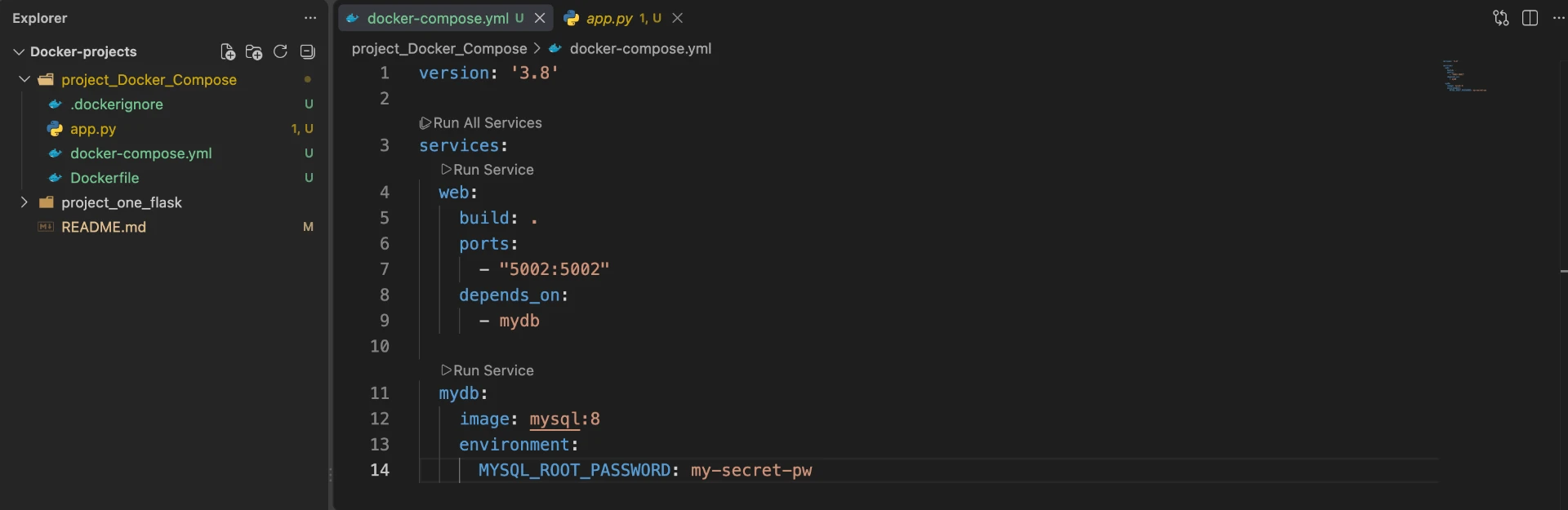
Stage 01 — docker-compose.yml declaring the web service (build ., port 5002) and the mysql:8 database service with depends_on.