Multi-Container Application — Flask + Redis
Built a two-service containerized application: a Python Flask web app exposing a welcome route and a live visit-counter route, with Redis acting as the in-memory key-value store holding the counter across requests.
- Problem
- State kept inside the app process vanishes whenever the container restarts.
- Tools
- DockerDocker ComposeFlaskRedis
- Result
- The counter lives in Redis on a volume, and services find each other by name.
Architecture
- Step 1: The browser hits / for the dashboard or /count to increment the counter, on port 5003.
- Step 2: Flask finds Redis by service name (REDIS_HOST) with a password. No hardcoded IPs.
- Step 3: The counter lives in Redis on a volume, so it survives container restarts.
- Flask + Redis orchestrated
- 2 services
- Counter persisted in Redis
- Stateful
- No hardcoded IPs
- Service DNS
Why it matters
Services can restart or scale without losing state. Separating Flask and Redis kept the counter across requests and restarts, and service discovery removed hardcoded addresses from the configuration.
The problem in detail
A web application that keeps state in its own process loses that state the moment the container restarts or scales. The counter needed to live outside the app container, in a dedicated data service the app reaches over the container network rather than over a hardcoded address.
What I built
- 01
Wrote a Flask application with two routes: / rendering the dashboard and welcome view, and /count incrementing and reading a visit counter stored in Redis.
- 02
Containerized the app with a slim python:3.11-slim Dockerfile — WORKDIR, COPY, pip install flask redis, EXPOSE 5003 and a CMD entrypoint.
- 03
Declared both services in docker-compose.yml: a redis:7-alpine service started with --requirepass and its port published, and the built web service with depends_on ordering.
- 04
Passed REDIS_HOST, REDIS_PORT and REDIS_PASSWORD as environment variables so the Flask container resolves the database by service name through Compose's internal DNS instead of an IP address.
- 05
Configured a Redis volume for persistent storage so the counter survives container restarts, then verified live increments by refreshing /count.
Evidence
01 / 05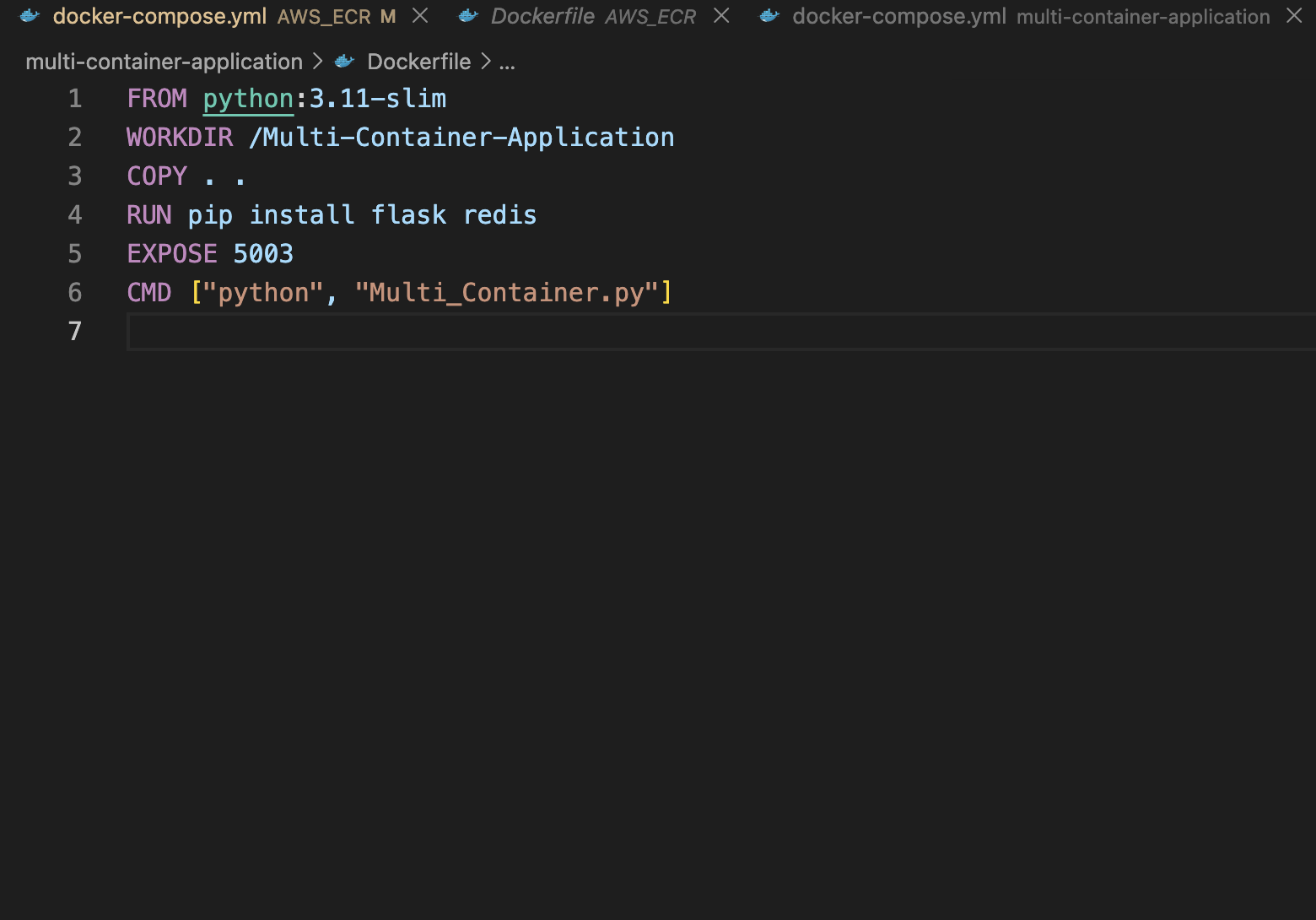
Stage 01 — Dockerfile for the Flask service: python:3.11-slim base, dependencies installed, EXPOSE 5003 and the app entrypoint.